
livepython.net
CHAPTER 01Introduction to Python
1.3  HOW IT RUNS

How Python Runs Your Code (The Interpreter Explained)

Python Code Is Plain Text

Python code is just plain text: letters, numbers and symbols, like a message. You could even write it in a simple notes app.

When you save Python code on a computer, you put it in a file whose name ends with .py, for example hello.py. That ending tells the computer: "this file holds Python code".

File nameWhat it holds
notes.txtPlain text notes
photo.jpgA picture
hello.pyPython code

Most programmers write code in a code editor, an app made for writing code. A code editor colours the different parts of your code and warns you about some mistakes while you type. On LivePython, every lesson already has a small code editor built in, so you don't need any other app.

Text alone does nothing

Here's the important part: a .py file on its own does nothing at all. It's like a recipe in a drawer. Someone has to read it and follow the steps.

For Python code, that "someone" is a program called the Python interpreter. You'll meet it in the next lesson.

Python code is just text, until Python runs it.
your turnPick the right idea

Which file holds Python code?

Think about it, then pick one.

What Is the Python Interpreter?

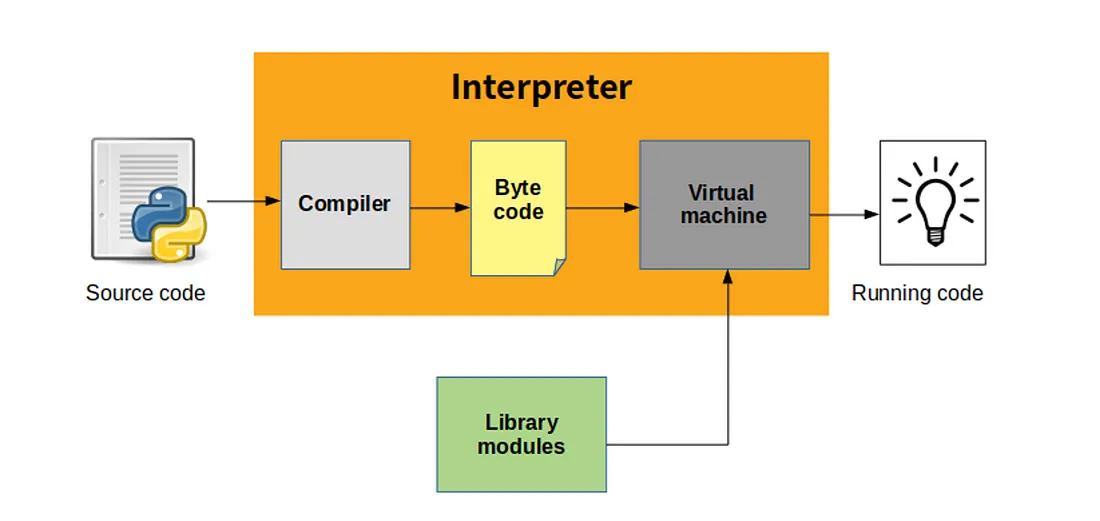
The Python interpreter is the program that runs your Python code. When you press Run, the interpreter reads your code and does what it says.

It works in three steps:

  1. Check. It reads your whole code first and looks for mistakes in the syntax, like a missing bracket. If it finds one, it stops before running anything and tells you where the problem is.
  2. Translate. It turns your code into bytecode: simpler instructions that are quicker for a computer to follow.
  3. Run. A part of the interpreter called the Python Virtual Machine follows the bytecode step by step. This is when you see your output.

How Python runs code: your source code goes into the interpreter. Its compiler turns the code into bytecode, and its virtual machine runs the bytecode, using library modules when needed, so the code runs.

Think of the interpreter as a chef with your recipe. The chef first reads it through to check it makes sense, then gets the kitchen ready, then cooks one step at a time.

All of this happens in a blink. On LivePython, the interpreter runs inside your browser, so your code runs the moment you type it.

You write the steps. The interpreter checks them, then follows them.

your turnPick the right idea

What does the Python interpreter do?

Think about it, then pick one.

Python Runs Your Code Top to Bottom

Python runs your code from top to bottom, one line after another, just like you read a page.

PYTHONedit me
print("First")
print("Second")
print("Third")
OUTPUT
First
Second
Third

Each print() shows its text on a new line, in the same order as the code.

Order matters

Now try this: in the editor above, move the line print("Third") to the top. Run it, and the output changes. Python doesn't sort your lines or guess what you meant. It simply follows them in order.

Think of a morning routine: wake up, brush your teeth, eat breakfast. If you swap two steps, the result is very different. Code works the same way.

This becomes really important soon. In the Variables chapter, one line will store a value and a later line will use it. If the lines are in the wrong order, Python tries to use something that doesn't exist yet, and you get an error.

Python reads like you do: top to bottom, one line at a time.

your turnPredict the output

What will this print?

print("Sunny") print("Rocky") print("Lucky")
Your turn! What will this code show on the screen?
your turnOrder the lines

Put the lines in order to print One, Two, Three

  1. print("Three")
  2. print("Two")
  3. print("One")
These lines are mixed up. Put them back in order, then press Check.

Errors Stop the Program

Sometimes Python finds a mistake while it runs your code. Then it stops and shows an error message. The lines after the mistake don't run at all.

PYTHONedit me
print("Start")
prnt("Middle")
print("End")
OUTPUT
Start
NameError: name 'prnt' is not defined

Line 1 ran, so you see Start. Line 2 has a typo: prnt instead of print. Python doesn't know a word called prnt, so it stops. Line 3 never runs, so End never appears.

How to read an error

An error message is Python pointing at the problem. It tells you three things:

  • Where: the line number. Look there first.
  • What kind: the error name, like NameError or SyntaxError.
  • Why: a short message, like name 'prnt' is not defined.

On LivePython, you also get a plain-English hint under each error.

Errors are normal

Don't be scared of errors! Every programmer sees them all day long. An error doesn't mean you're bad at coding. It's a clue that tells you exactly where to look. Fix the line, run again, and keep going.

Try it now: fix the typo in the editor above, and watch Middle and End appear.

An error is not a failure. It's Python pointing at the line to fix.

your turnSpot the bug

Which line breaks?

One line stops this program. Tap it.
your turnPick the right idea

Which lines ran?

print("A") prnt("B") print("C")
Think about it, then pick one.